Overview
I joined SunFuel Electric in its early days, driven by a vision to make electric vehicle (EV) travel worry-free across all of India. We knew that achieving this freedom required a reliable and accessible EV charging infrastructure. After developing our Level 2 charging station, Monolith, our focus shifted to enhancing the app experience for our customers. I led the redesign of the mobile app, collaborating with a team of four talented designers from IITs over a span of two months to deliver a more intuitive and user-friendly interface.
Due to NDA restrictions, the full research behind the app cannot be shared. However, I’ve presented here, four key improvements that were directly informed by customer feedback.
Understanding The Challenges
01 : Market Analysis & EV Ecosystem Mind-Map
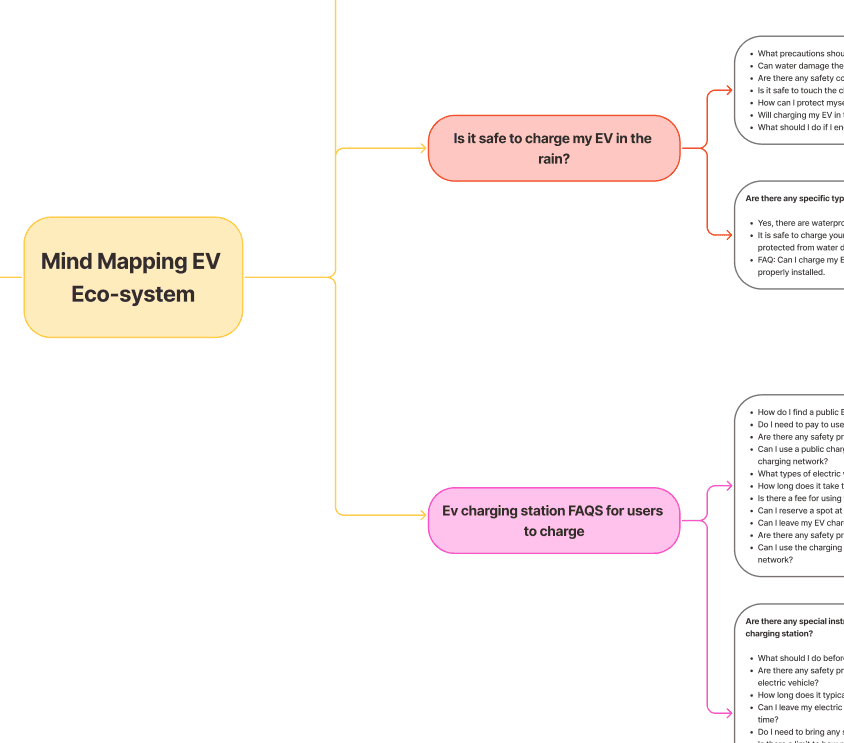
After researching top apps by global Charge Point Operators (CPOs), we shortlisted four—ChargePoint, InstaVolt, Fortum, and Tata—for their versatility, user-friendly design, and smooth software-hardware integration.
As EV was still emerging in India, we explored the ecosystem through a mind map of team-driven questions and interviews with early adopters to uncover insights and areas for improvement.
View details on FigJam
02 : User Insights From Using the SunFuel App
After researching top apps by global Charge Point Operators (CPOs), we shortlisted four—ChargePoint, InstaVolt, Fortum, and Tata—for their versatility, user-friendly design, and smooth software-hardware integration.
As EV was still emerging in India, we explored the ecosystem through a mind map of team-driven questions and interviews with early adopters to uncover insights and areas for improvement.

View details on FigJam
With all the collected data, we mapped the challenges into a groups, we weighted each challenge based on feature prioritisation method - Core, Augmented and Delight.
Core
Locate and navigate to available charging stations on a map
Start and stop charging with a QR code or a station ID
Get real-time updates on the charging status such as time, cost, charging level
Pay for charging through the app, credits or payment gateways or any flexible payment options
View your charging history, filter options, manage your profile, access help and support
Access FAQ section and help center for user queries
Augmented
Get feedback from other users about charging stations
Check ratings and descriptions of charging stations
Schedule charging sessions, set reminders, receive notifications and track usage
Reserve a slot in advance to save time
Find chargers that are compatible with your electric car
Delight/ Magic
Find all the stations along your road trip route
Manage off-road trails with hotels, roadmaps and community features (e-trails)
Collect and analyze data on your electricity consumption and charging behavior
Vehicle info where they can get updates about their EV and monitor the conditions also receive notifications if your EV gets discharged and needs charging
Carbon emission monitor
Navigation and voice control in your EV
App Improvement #01
"It's difficult and time consuming to find the right charger and charging port to start the session."
-A frequent EV traveller


Original App
Navigation elements placed at the top were hard to access, affecting ease of use. Additionally, active filters weren’t visibly indicated, leading to potential user confusion.
User location wasn’t displayed, limiting personalized or location-aware experiences.
Menu pages lacked clear labels, and the app’s primary features were not immediately apparent, reducing overall usability and feature discoverability.
SOLUTION 1
Map Layout
Labels added to pins for clarity in the card drawer.
Car icon shows user location on the map.
Search and filters moved to bottom for better reach.
Charger status visible at a glance.
Cards highlight nearest stations for quick decisions.
Menu items reordered by most-used features.

FINAL SOLUTION 1
Map Layout
Car model selection filters locations by charging compatibility.
Map pins are highlighted without labels since cards show location info.
A directional cone guides users to the charger on arrival.
Cards display only key details for quicker scanning.
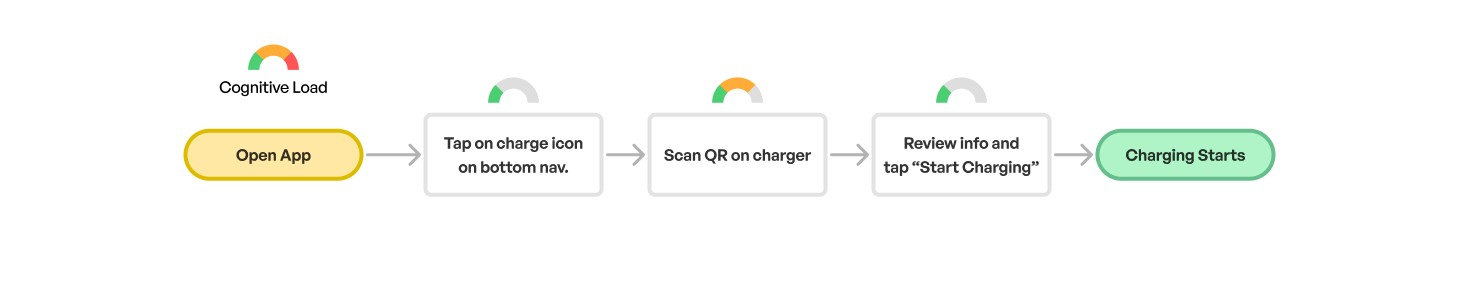
Scan the connector to start charging in just two taps.


SOLUTION 2
Location Cards
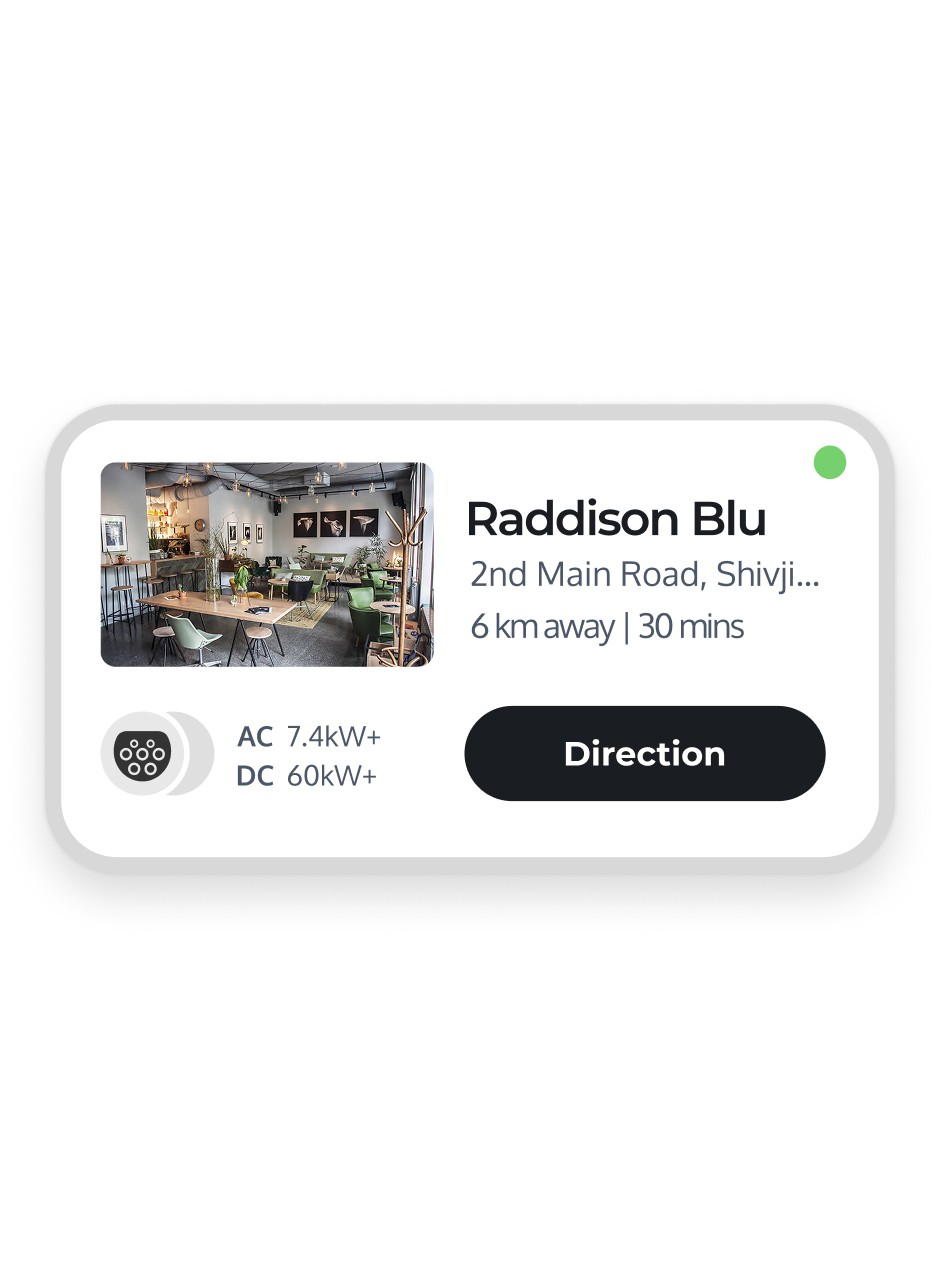
Distance and ETA were key metrics for EV users, with a “Direction” button linking to navigation.
Charger options shown upfront for quick comparison.
FINAL SOLUTION 2
Location Cards
Cards were compacted to maximize map visibility.
"View Station" removed, as users intuitively tapped on the card title to expand.
Charger output info prioritized, showing AC, DC, or both, with starting output values.
App Improvement #02
"Charing station layout is confusing when there are multiple options to choose at one location."
-A frequent EV traveller


Original App
Displaying charger names doesn't aid in choosing the right charger.
Chargers with varied outputs per nozzle cannot be listed under the same unit.
Location section hidden when more than 3 charging stations are listed.
SCENARIO
Planning for Complex charging station layout
Includes AC and DC charging units.
Charging units with one, two and three connectors.
Same charger to include 2 or 3 connectors of different output rating.
Information page to include:
OUTPUT RATING
CHARGER NO. + ID NUMBER
CONNECTOR TYPE
AC / DC
STATUS
SCENARIO LAYOUT REPRESENTATION

SOLUTION 1
Charging Station Page layout
Keeping the same colour code as the status indicators on the physical charger unit.
Indicating the maximum power output from each connector.
Inactive connectors greyed out.
Occupied connector status.

FINAL SOLUTION 1
Charging Station Page layout
Users who follow a daily charging routine often have a specific public charging station they prefer to use. The Save option tracks users' preferred stations and suggests alternative charging locations if their usual station is occupied.
A one-line list of amenities helps users give deeper consideration to the location.
Quick session start by scanning the QR code on the connector port.

App Improvement #03
"Every charging app I have to download shows a different interface and that gets me frustrated."
-A frequent EV traveller

Original App Flow
Showing the charger name to the user does not add useful information about choosing the charger.

SOLUTION
Revised App Flow
Keeping the colour code the same as the status indicators on the physical charger unit.
Indicating the maximum power output from each connector.
Inactive connectors greyed out.
Occupied connector status
How it works
Keeping the colour code the same as the status indicators on the physical charger unit.
Indicating the maximum power output from each connector.
Inactive connectors greyed out.
Occupied connector status

App Improvement #04
"I'd like to know when the connector will be available next."
-A frequent EV traveller

SOLUTION
Charging Station Status
Users can be notified in two instances:
When the charger is unavailable due to maintenance (indicated by a greyed-out status).
When another user is actively charging their vehicle (indicated by a blue, On-going status).

What's next?
Based on customer feedback and interviews, we've created a structured rollout plan. We'll first release the core app features, and once their stability is confirmed, we'll proceed with the next set of peripheral features. After launch, we'll maintain an active feedback loop with users to gather insights on the new interface and continue enhancing the app experience.
What I learned
The most valuable insights came from being directly present with customers during actual app usage.
I temporarily applied for the role of site manager at the Bangalore Golf Club charging stations, providing personal assistance whenever issues arose. These one-on-one interactions were incredibly revealing, uncovering user experiences that surveys and phone interviews couldn’t capture. This hands-on approach deepened my understanding of user needs, and I plan to carry this mindset of working closely with users into all my future projects.

UP NEXT