Kasa App Demo
Overview
In 2021, I moved to Bangalore and found myself in the middle of an all-too-familiar challenge—searching for a new apartment. The first step was finding the right platform that could help me discover available rentals efficiently and within a short time.
While the apps I used were helpful in shortlisting properties and offered intuitive interfaces for browsing listings and tracking conversations with owners, I soon realized there was more to be desired. And finally settling into my new apartment, I often caught myself thinking, “I wish I had known this before moving in.”


Discovering the current challenges?
Working within a defined project timeline, I began by conducting user interviews to gather qualitative insights. These conversations shaped the foundation for a more targeted survey that followed. It quickly became evident that many users shared similar frustrations—mostly revolving around a lack of transparency and the difficulty of aligning property choices with their immediate priorities.
01 : Literature Study: Rental Market
02 : Interviews
03 : Survey
04 : Competitor Analysis
05 : Stakeholder Mapping
06 : Affinity Mapping: User Insights & App Reviews
Five Distinct Requirements
Designing an application for a diverse user base—spanning various age groups, social backgrounds, and life stages—meant addressing a wide range of needs when it comes to finding a new home. Drawing from the insights mapped in the affinity diagrams, user requirements were classified into five core requirements that formed the foundation for the design direction.
REQUIREMENT 1
Finding an optimum location to minimize daily commute
Two fresh graduate moving to a new city
More info
A family moving to a new city
More info

REQUIREMENT 2
Finding a safe neighbourhood with the right ambience
A working professional takes an informed decision while visiting listing
More info

REQUIREMENT 3
Accessibility to and within the house
A man with movement disability is looking for accessible properties
More info

REQUIREMENT 4
A mode of open communication
A woman who has spent a month at the apartment and noticed a broken tap.
More info

REQUIREMENT 5
Personalised interface to minimize filtering effort
Newcomer who has a short time to find an accommodation.
More info

What support do owners need?
Before addressing what owners need to effectively create and manage property listings, it's important to first understand the behaviours and decision-making patterns tenants exhibit when browsing those listings.
Emotional Appeal: People often make decisions based on emotions like comfort, security, or status associated with a particular place.
Social Proof: The tendency to follow the actions of others can influence decisions; positive reviews or recommendations from friends can sway choices.
Anchoring: Initial impressions of a property can heavily influence decision-making; features like aesthetics or location can act as anchors.
Loss Aversion: Fear of missing out or losing a good opportunity can drive people to make quicker decisions when investing in a property.
Confirmation Bias: People tend to seek information that confirms their preconceptions about a property rather than objectively evaluating all aspects.
"It's frustrating to visit a shortlisted place only to find it doesn't match the listing."
-34 year old parent

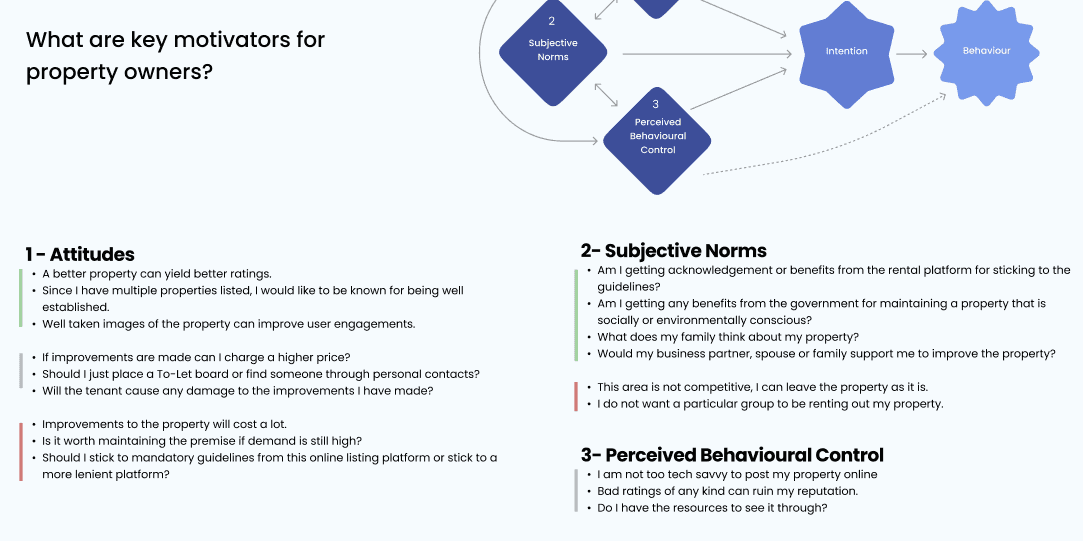
The theory of planned behaviour/reasoned action: This theory posits that behaviour occur because of intention, and intention is influenced by personal attitude and the perceived social norm. (Madden, Ellen, & Ajzen, 1992).
Perceived behavioural control is a person’s confidence in their capability to perform the behaviour and whether they believe they can overcome barriers and challenges. This extended model is known as the theory of planned behaviour.
Based on the theory of planned behaviour, the motivation factors for the owner becomes evident and an app that shows property listings takes the shared responsibility to incentivize good practices by the owners and support them along the way. In contrary to just collecting information and uploading it to the database with minimal checks, bringing awareness to how a well listed property can aid their long term goals and what are the steps to improve their listing.

View complete planned behaviour chart on FigJam
Solutions (Efforts Vs. Impact)
The five requirements served as the foundation for brainstorming potential solutions. These solutions were then mapped on a graph comparing effort and impact. To validate the placements, some users were consulted to share their opinion. This helped prioritize features that offered the highest value to users while requiring minimal development efforts.


View solutions table on FigJam
User's Decision Journey
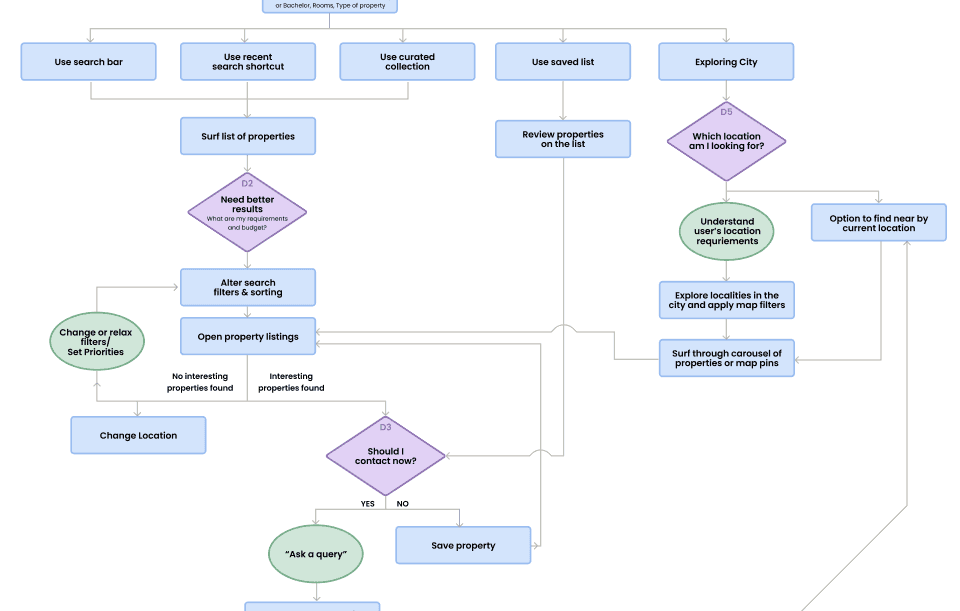
To better understand the user's journey from the initial thought of finding a home to eventually moving in, a decision tree was used to map out each step. The purpose of this exercise was to identify key moments where users needed proactive support to make informed decisions. This support could come in the form of clear guidance or bite-sized information aimed at reducing cognitive load and simplifying certain processes.
DECISON 1
Which app to download?
Based on ratings, features, reviews..
DECISON 2
Need better results
What are my requirements and budget?
DECISION 3
Should I contact now?
DECISON 4
Can I visit the property?
Already moved to a property, busy...
DECISON 5
Which location am I looking for?

A supportive brand identity
The name Kasa for the app draws inspiration from the familiar phrase “Mi Casa, Su Casa,” evoking a sense of warmth, belonging, and home. With an Indian twist, it’s pronounced as “Kh-asa”, echoing regional meanings across India such as special, unique, and even fine fabric—all of which align with the essence of the brand. The icon reflects this spirit through a calming geometric form, symbolizing a roof above a strong foundation—a visual representation of comfort, stability, and thoughtful design.

Sky blue was chosen as the primary color palette to evoke a sense of calm and clarity amidst the often stressful process of searching for a home. To add vibrancy and support functional clarity within the app’s interface, a range of primary accent colors were introduced. These colors help bring the experience to life by visually distinguishing key elements such as messages, categories, alerts, and actions, making the interface not just aesthetically pleasing but also more intuitive and engaging for users.

Developing Solutions
In this section, I’d like to walk you through some of the interesting solutions that emerged from the early brainstorming sessions.


1.Adaptive Listing Cards
The listing cards are designed to prioritize information dynamically—based on where the card is being viewed and the user’s individual preferences.
The cards highlight attributes the user has previously shown interest in, making the experience more personalized and relevant.
When a property is shortlisted, the Owner Info section conveniently appears at the bottom of the card, allowing quick access without needing to dive into the property page.
2.Points and reward system
A points and rewards system was introduced to incentivize user engagement and feedback, encouraging actions like profile completion, reviews, and reporting issues—making the platform more interactive and trustworthy.


3.Split-second inputs from users
As users browse property listings, quick, contextual questions appear to gradually learn their preferences—eliminating the need for a long upfront survey and creating a more seamless experience.
4.My Pins
This feature allows users to place custom markers on the map, making it easy to visually analyze the property’s proximity to key personalized locations like workplaces and schools.

Information Architecture
Outside Looking in
When users first explore a new city, the app layout is designed to guide them toward discovering neighborhoods before diving into property listings. This approach encourages users to familiarize themselves with the areas, local amenities, and community vibes, ensuring they make more informed decisions about where they’d like to live.

Step-by-step navigation
The menu options are organized in a logical sequence that mirrors the user’s journey—starting from discovering properties, moving to shortlisting favorites, and finally contacting the property owner.

Map tool-kit
Draw Area
Define preferred location with precision by drawing areas of interest directly on the map.

My Pins
Personalize your rental search by adding custom pins for important locations

Show On Map
Easily pinpoint nearby amenities, traffic conditions, and AQI levels


Testing Assumptions
A group of 5 users was tasked with achieving a set of goals while interacting with the low-fidelity prototype. Each participant was asked to think out loud as they performed actions and explored the interface, providing valuable insights into their thought process and user experience.
TASK 1
Onboard the app
TASK 2
Shortlist 2 apartments
TASK 3
Contact the owner from your first search result
TASK 4
Search for an apartment with exactly 22k rent via list view
TASK 5
Search for an apartment with exactly 22k rent via map view
TASK 6
Find near-by hospitals on the map view
TASK 7
Get information about Koramangala locality
TASK 8
Find Kasa points page and offers available


What Worked ✔️
Positive feedback on locality page with practical information for residents.
Terms shortlist & liked can’t be interchangeable. However users understand “liked” sections purpose
The option to view a property on list view to the map is helpful
What Didn't Worked ❌
Points and benefits need to be highlighted for a first time user.
Image of property in chat page would be helpful.
Total search results for present/updated filters.
General Feedback
Incorporate local amenities searches from the main search bar.
Some prefer to get contact number instead of entering chat.
Map tools are unclear without a label.
Helpful to have suggestive actions when the user has exhausted with searches.
The "Locality" button should evoke a sense of leading to additional information.


What's next?
Once customers locate and settle into their new property, the application often gets side-lined, tucked away in a corner of the app drawer. However, this scenario presents a business opportunity for real estate apps to have a secondary purpose that revolves around transitioning the app interface into a service-centered hub. This switch can facilitate the promotion of vouchers and various services such as maintenance, document management, rent and bill payment gateways, and more. According to survey findings, 40% individuals are willing to give it a try initially to assess its practical and financial benefits.

What I learned
I learned to translate vast data points into user requirements and, ultimately, into actionable design solutions.
While every problem follows its own unique design thinking cycle, this project began with a mindset of “problem seeking” rather than jumping straight into solutions. One of the key challenges was keeping personal biases in check—especially when many early ideas seemed promising on the surface. Adopting this mindset pushed me to critically evaluate decisions through the lens of the five core user needs uncovered during research, ensuring that each solution was grounded in real insights rather than assumptions.

UP NEXT