Core AI Demo
Overview
Inspired by the challenges I faced teaching my grandparents to use apps, this project explores how AI can bridge the gap in user interaction across all age groups, improving adoption and efficiency.
Initially, they struggled with navigating menus, performing gestures, and understanding app layouts. However, through repetition and taking countless notes, they became experts, making app use feel like second nature. This led me to ponder on the learning curve for AI posses across all age groups and its potential to enhance our day-to-day activities. And to begin, it starts with the question..

How can an AI assistant be helpful? Is it even needed?
Who is it for?
Grouping by Age
Age became a key factor in distinguishing user groups, as people in similar age ranges often share common priorities in their lives. Studies have shown age-related differences in usage and the frequency of use depend on the technology domain.*
*Diffusion of Technology: Frequency of Use for Younger and Older Adults
Persona Types
LIAM / 31
The Explorer

ETHAN / 68
The Learner

How are things looking so far?
After a primary study of existing platforms and interviews with users, a survey was designed to delve deeper into people's experiences and expectations. The survey was segmented into different age groups and distinguished between students and working professionals to explore how usage patterns evolve for individuals over time.
"I do not trust AI to make critical actions for me like booking a hotel room or a flight"
-Tech-savy 46 year old adult
Only 14.3% of individuals were open to the ideas of letting AI take critical decisions. User's need to double check decisions that affect their money, safety or time.


"I use it daily but only for tasks I know it has handled well before. I've also discovered some features I didn't know it ever had!"
-21 year old college engineering student
87% of participants use digital assistants regularly (on smartphones and smart home devices). Limited awareness of features. Features that help in automation often seem too complicated to set-up.

View complete survey results on FigJam
Project Challenges
Defining the scope
Given the vast potential of AI across various applications, it's crucial to identify the key challenges and scope of the design problem. To guide this, I analyzed user engagement with popular AI assistants such as Google Assistant, Gemini, ChatGPT, Claude, Siri, and Alexa. The insights were drawn from three primary sources: regular user interviews, app store reviews, and published online surveys—including PWC’s Consumer Intelligence Series: Prepare for the Voice Revolution.
View Research (Learnings, Competitor Study, Ideas and more)

Testing
While testing applications with fixed user journeys and defined use cases is straightforward, AI applications introduce added complexity—since a single feature can support multiple and often personalized operations.
To manage this, I introduced constraints for the design process. Affinity mapping of user insights revealed four key pain points: Personalization, Transparency, Engagement, and Accessibility. These became the foundation for identifying solutions and structuring tests. That said, for a commercially viable product, the accuracy and reliability of these tests would be significantly improved with a developer-ready handoff prototype.

What to consider
*90% of individuals in own a smartphone. With also a majority of 76% of users ages 65+ use smartphones on a daily basis. Smartphones stand out as the prime candidate for integrating AI assistance seamlessly to the daily activities.
*Pew Research Center - Mobile FactMoreover, the necessity of a screen arises to strategically visualize information, enabling users to analyze and modify actions as required.

Voice is our natural way to converse. Though the tech has it’s quirks based on local accents and dialects, ML models will keep improving with usage and will form personalised data sets for users. Additionally considerations are conversational cues, pauses, tone, timbre, delivery, and so on. The details that make conversations feel natural.
Gestures are essential for collaboration, especially when seeking assistance with content on the screen, where voice commands can be an unnecessary extra step.

While a feedback system holds the potential for app improvements, it runs the risk of frustrating users due to factors such as timing and frequency. In addition to integrating guidelines for in-app feedback collection, AI can elevate the process by being attuned to user comfort levels with feedback prompts. Adopting a friendlier approach to soliciting feedback to get more positive and effective results.

CORE - Your AI space
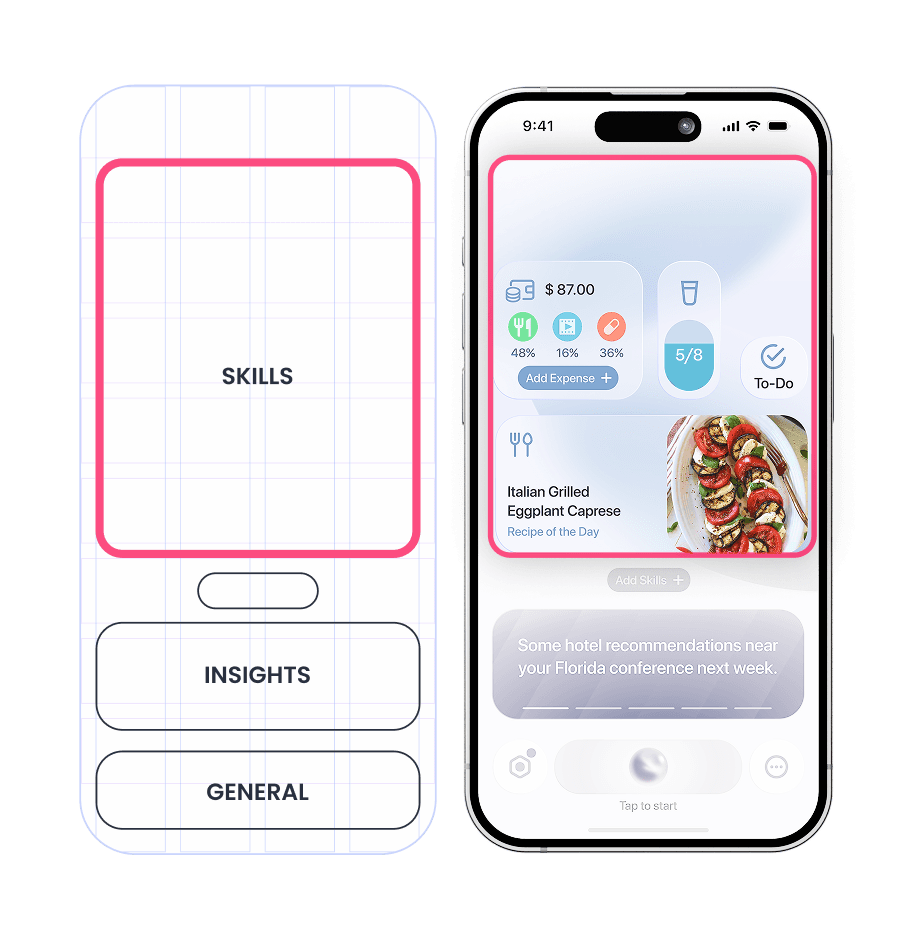
CORE AI is designed to be an integral part of the phone's operating system rather than a standalone application. This ensures seamless integration and enhanced data control, prioritizing user privacy. Additionally, users need a way to interact with the AI beyond conversation. To address this, a dedicated interface was designed to highlight the AI's core features: "Skills," "Insights," and "General".

Skills
The concept of "Skills" arises from the need for the AI to adapt to each user's unique needs and preferences, unlike traditional apps designed for the masses. With generative AI, this feature has the potential to build trust over time and accelerate adoption.
How "Skills" work
To illustrate how it works, let’s take an example of a user named Alvin. He enjoys cooking his own meals but struggles with creating recipes. To address this, he opens CORE AI and taps on "Add Skill +". The AI then guides him through a series of questions to understand his needs and suggests relevant features. Using the power of generative AI, a custom micro-app is seamlessly created, tailored specifically to his cooking preferences.


However, this concept also presents several design challenges:
Handling complex requests can be technically demanding, requiring the AI to generate bug-free applications that perform as expected.
Interpreting user inputs accurately is crucial. If the AI misinterprets a request, users are likely to blame the system, which could impact trust.
Ensuring data security for each generated app by implementing robust security protocols.
User testing will be essential to refine the system and create an optimal version.
Feature Studies
This section showcases the evolution of some features that have undergone at least one cycle of design, testing, and refinement when comprehension testing with users.
AI Interface
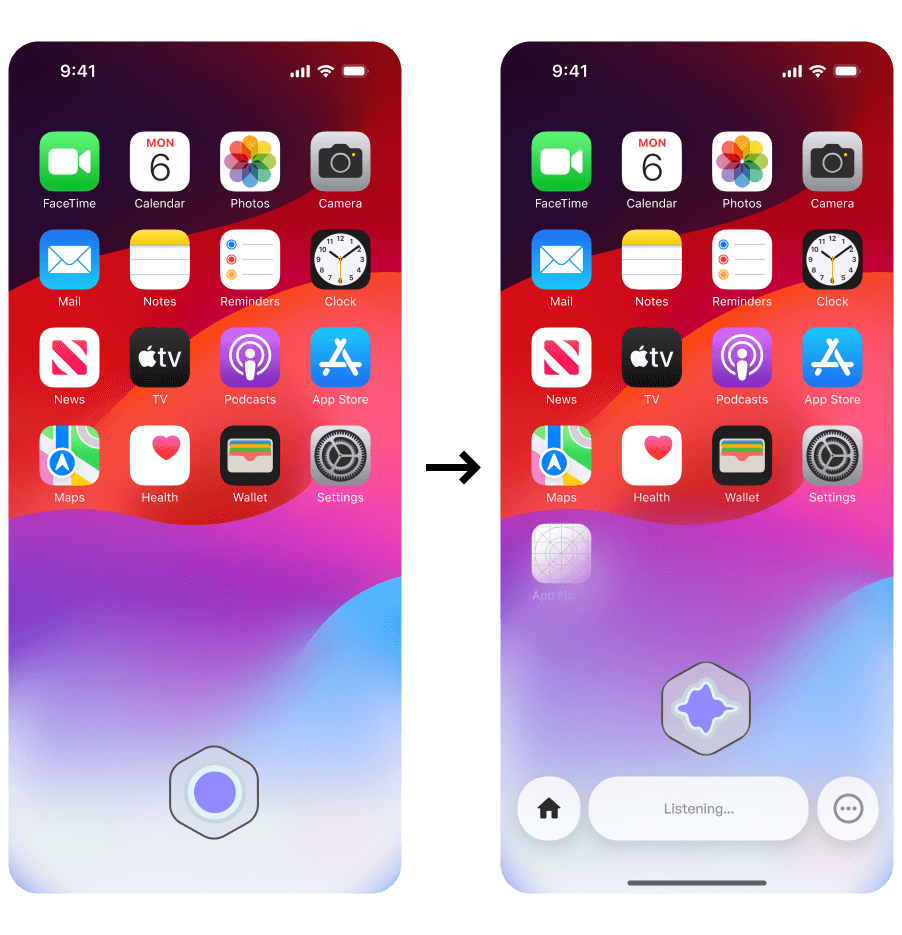
SOLUTION 1
Floating Avatar
While this takes lesser space when activated, it is takes more space when the dock come along with it which houses the quick actions, home and status indicator.
In case of switching to type mode, it was neither intuitive nor easily accessible.

REVISED SOLUTION 1
Integrated Dock
In this design, the AI avatar stays within dock and the status indicator is placed below it. Additionally, when voice input is activated, the options button changes to a keyboard button.
View Full Interaction Flow Chart


Final AI Interface
In this design, the AI avatar stays within dock and the status indicator is placed below it. Additionally, when voice input is activated, the options button changes to a keyboard button.
Priority & Insights
To have a personal assistant who helps plan and organise schedules is what users have come to expect. And just like a human-assistant takes time to learn and adapt based on the user, they AI will need to take in ample information of user's behaviour and priorities when planning.

SOLUTION 1
Calendar Format
This UI layout is familiar to users who have used apps like Microsoft Teams and Google Calendar. What would be more helpful in a personal assistant is to provide insightful notifications based on users priorities rather than just a time-based layout.
REVISED SOLUTION 1
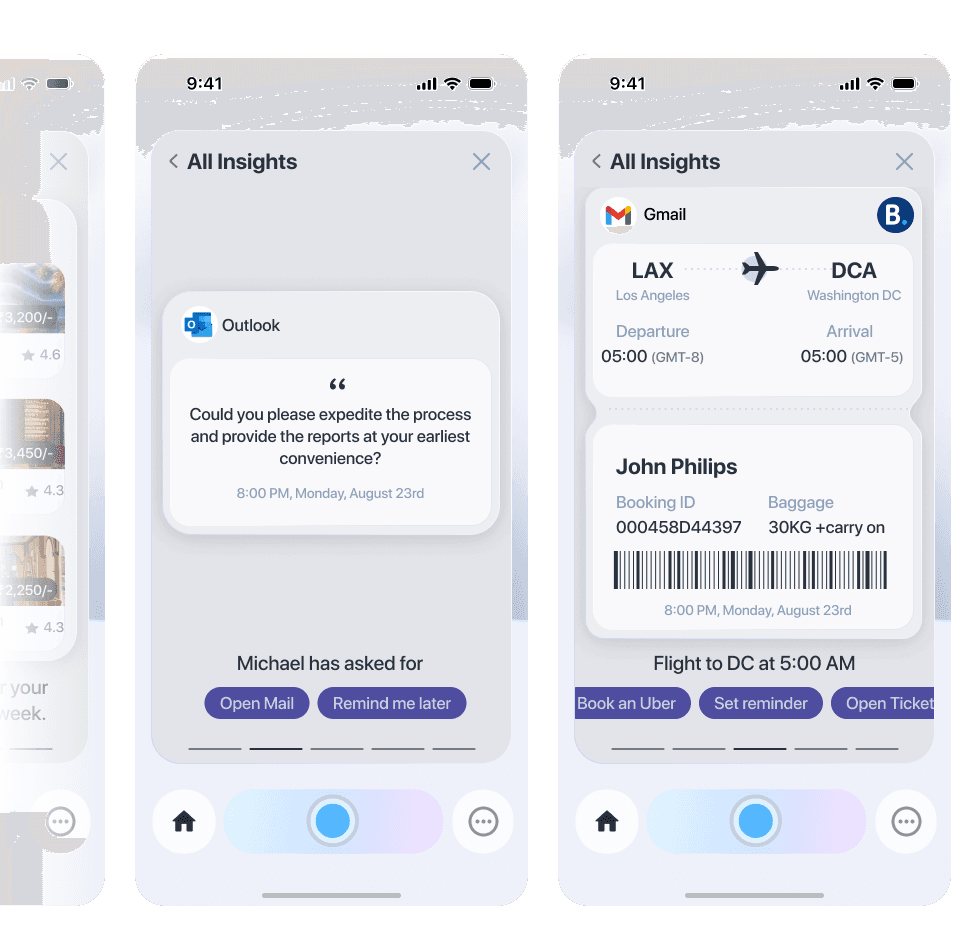
Insights Format
This format allows the AI to create curated information for the user based on their priorities. Showing information when it is relevant rather than based on a fixed timeframes.
For example, instead of showing just an upcoming flight boarding pass, it also mentions the time to leave home based on live traffic information.
Chat Interface

SOLUTION 1
Essential Actions
Each user speech bubble's includes an edit option, while every response is accompanied with three quick action buttons: "Pin," "Length of response," and "Highlight." The Highlight feature identifies key points in a lengthy message, making it especially useful for the limited screen space on mobile devices.
SOLUTION 2
Feedback Collection
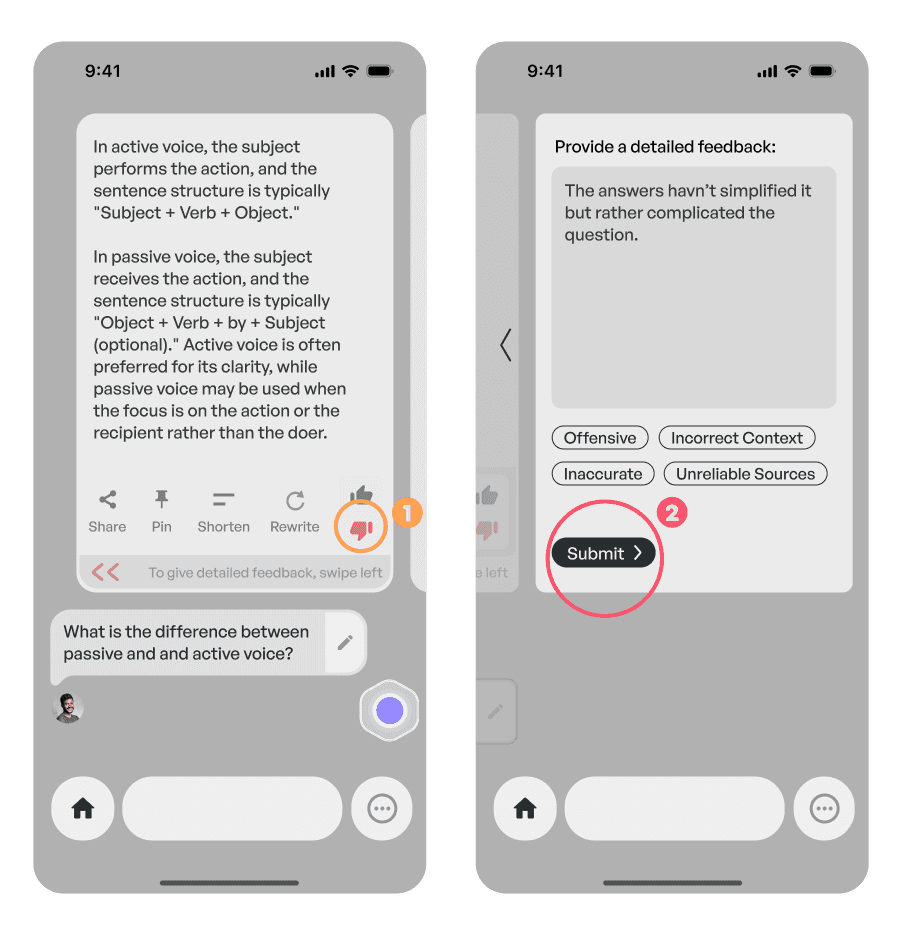
User feedback revealed that the thumbs up/down feature is rarely used, so it has been moved to a dropdown menu to reduce visual clutter.
However, when a user gives a thumbs down, a prompt for detailed feedback appears—only if the user opts in—ensuring the experience remains focused and uninterrupted.
Collaboration on the go

"Sometimes all I need is some assistance to use my daily apps."
-68 year old retired adult
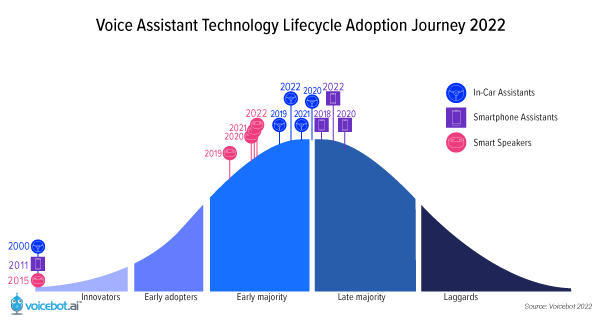
Voice assistant adoption seems to have settled into a comfortable 50-60% of the population. The pandemic brought on a small decline in total users which was largely driven by lower access of voice assistants for on-the-go use cases.*
*Voicebot 2022
CONCEPT 1
Contextual Conversations
When viewing content on a phone, how can users engage with AI—ask questions, get clarifications, or continue a conversation, all while not losing sight of the content itself?
This concept explores an contextual interactions with the AI while keeping the user anchored to what they’re viewing, ensuring the experience remains uninterrupted.

CONCEPT 2
Calling out aI skills
Just like conversations over live content, invoking AI skills on the fly empowers users to build their own personalized workflows.
Take Linda, for example—a passionate interior designer who wants to keep her inspirations organized. While platforms like Pinterest offer boards to collect references, she’s still confined to a single app. This is where an "AI skill" acting as a smart whiteboard becomes valuable—letting her capture and organize inspiration from anywhere, across apps, all in one space.


CONCEPT 3
Overlay Skills
While calling out AI skills does not require the skill application to open up on the screen, "AI Skill Overlays" can split the screen to present "AI Skills" that appear as an extended tool. For example here, the notes app pops up to keep note of what the user says while he scrolls through the page.


CONCEPT 4
Live Walkthroughs
If a user struggles with navigating their phone or its apps, this feature provides step-by-step guidance by highlighting actions on the screen. It empowers users by turning confusion into clarity, one tap at a time.


What's next?
While data from interviews, surveys, and research papers can inform many solutions, most features will still require thorough testing with a solid foundational prototype. Equally important, is testing with a diverse user group to ensure representation across various cultural and regional backgrounds.
With AI tools evolving at a rapid pace, emerging technologies could significantly shift the design approach—requiring adaptability and continuous iteration.
What I learned
Ability to dive deep into research and apply system-level design thinking.
As the research phase unfolded, the problem statement formed more questions that answers. Defining clear guidelines and boundaries helped prioritize which challenges to address first, allowing the focus to remain on core basic user needs. Designing a generalized AI platform added another layer of difficulty, as the interconnected nature of its components demanded thoughtful integration—ensuring the system remained cohesive, functional, and intuitive.

UP NEXT